Free price history charts for your deal posts
When you post a deal on a Walmart, Best Buy or Home Depot product, show your readers what that product has actually cost. Add a PriceWatchPro price history chart: a picture of the prices we have recorded for the product, with today's price and the lowest and highest price in the period. It's free, it needs no account or script, and it stays current as we record new prices.
Example
This is the live chart for the Amazon Fire TV Stick 4K Max (2nd Gen) at Best Buy:
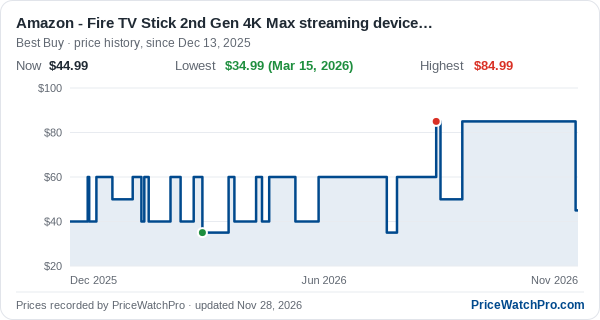
The code for this chart:
How to add a chart to your post
- Find the product on PriceWatchPro: search for it on pricewatchpro.com, or open it from the browser extension while you're on the store's page.
- Under the product's price history chart, open Embed this price history chart on your site and click Copy code.
- Paste the code into your post's HTML. In WordPress, use a Custom HTML block.
What's in the code
- An image of the chart, served from pricewatchpro.com. It's an SVG, so it stays sharp at any size and shrinks to fit narrow columns and phones.
- A link from the chart and a one-line credit, "Price history from PriceWatchPro", to the product's page, where readers can see every recorded price and set a free price-drop alert.
- No JavaScript and nothing to install.
Choose the period
The chart shows the last 12 months, or every price since we started tracking if that's more recent. For a
different period, add ?months= to the end of the image address in the code:
| Add to the image address | Shows |
|---|---|
?months=3 | the last 3 months |
?months=6 | the last 6 months |
?months=24 | the last 2 years |
?months=0 | every price we've recorded |
What the prices are
The chart shows the prices we found on our checks of each store's product data or website, the same prices as on the product's page here. We don't see coupons, in-cart or membership discounts, or prices that apply only in a store, and the store's price at checkout always applies. More in how we track prices.
Questions
Is the price history chart free?
Yes. You can use it on personal and commercial blogs and deal sites. Please keep the credit link under the chart.
Does the chart update by itself?
Yes. The image is drawn from the latest prices we have recorded for the product. Browsers and our network may keep a copy for up to 6 hours, so a new price can take that long to appear.
Which products can I embed?
Any Walmart, Best Buy or Home Depot product on PriceWatchPro with at least two recorded prices. Open the product and look under its price history chart.
Do I need JavaScript or an account?
No. The code is an ordinary image and a link, so it works anywhere you can add HTML, including the WordPress Custom HTML block. No account is needed.
Questions or a product you can't find? Contact us. Looking for deals instead? See today's biggest verified price drops.